Hosting
Hyvor Relay is a self-hosted, open-source email API for developers. Think of it as an alternative to AWS SES, Mailgun, or SendGrid, but you host it on your own infrastructure.
Architecture
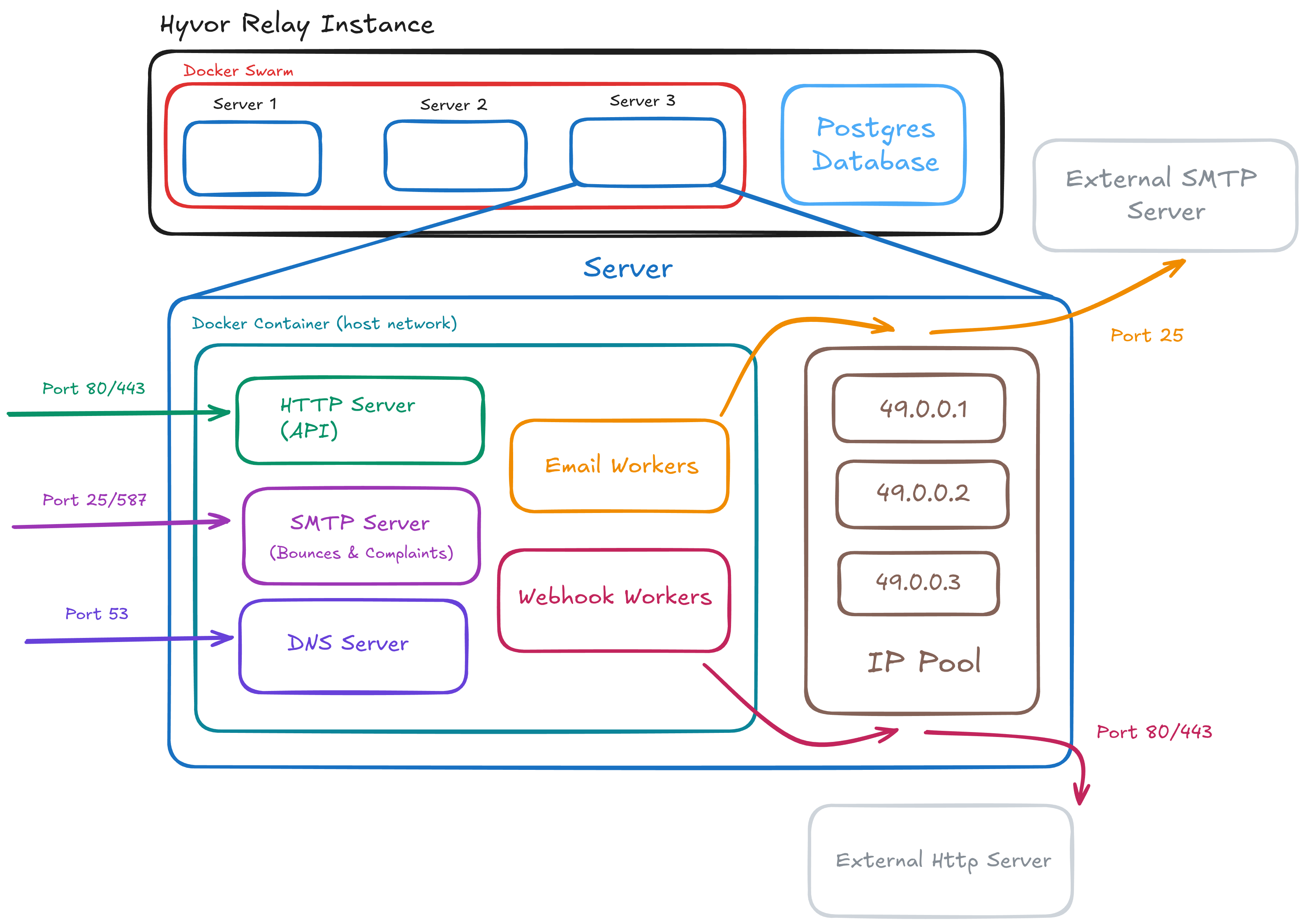
Hyvor Relay is a combination of several components that work together to provide a complete email sending solution:
- API server: Responsible for working as an interface between the end-user applications and the Hyvor Relay system. It exposes RESTful endpoints for sending emails, managing domains, etc.
- Email Workers: Responsible for sending emails via SMTP to recipient mail servers through pre-configured queues and IP addresses.
- SMTP Server: Handles incoming emails such as bounces, feedback loops, and also used as a compatibility layer for sending emails via SMTP.
- DNS Server: Manages DNS records for the instance domain, automating DKIM, SPF, PTR, and other DNS records required for SMTP & TLS.
- Webhook Workers: Responsible for sending webhooks to user-defined endpoints.
Here is a high-level architecture diagram of Hyvor Relay (click to enlarge):
What to expect
Here's a very short summary of what to expect when self-hosting Hyvor Relay:
- First, you would rent/buy one or more servers from a cloud provider of your choice. One is enough in most cases, but you can use multiple servers for high availability and scalability.
- Each server would have one or more public IPv4 addresses assigned to it. Hyvor Relay will choose these IPs for sending emails based on the queue they belong to (which you can configure). They will also be used for the built-in SMTP, DNS, and API servers.
- You would then also need a PostgreSQL database server. This can be a self-hosted database or a managed database service from your cloud provider.
- Then, you would deploy Hyvor Relay on the app servers using Docker Compose or Docker Swarm. Hyvor Relay will run on the host network to have direct access to the public IP addresses.
- Finally, you would need to configure DNS records to point the web domain to Hyvor Relay HTTP server. Then, you would also delegate DNS management of your instance domain to Hyvor Relay DNS server by updating the NS records. We discuss the web and instance domains in detail in the next pages.
Self-Hosting is first-class
Hyvor Relay is designed to be self-hosted easily for developers and organizations that want full control over their email sending infrastructure.
- Open Source: Fully open-source codebase available on GitHub. All features are (and will remain) available in the open-source version.
- Minimal Dependencies: Easy docker-based deployments with just PostgreSQL as a dependency.
- Automation: Automatic server registration, IP address configuration, and health checks. In-built DNS server for DNS automation.
- Self-contained: Everything (email workers, bounce SMTP server, webhooks, DNS) is built into a single docker image.
- Dashboards for ease: Web interfaces for admins and users to ease setup and debugging.
- Health Checks: Built-in health checks for all components to ensure smooth operation.
- Scalability: Designed to scale horizontally by adding more servers and workers.
- Industry-grade Monitoring: Prometheus, Grafana, Altermanager integrations are built-in for observability.
Get started: Easy Deploy (single server for small to medium sending volumes) or Prod Deploy (multiple servers for large sending volumes and high availability).
License
Hyvor Relay is licensed under the AGPL-3.0 License. We also offer enterprise licenses for organizations that require a commercial license or do not wish to comply with the AGPLv3 terms. Both licenses include the same features.
See HYVOR's Self-Hosting License FAQ for more information.
Security
DDoS
Layer 7: Hyvor Relay has built-in rate limiting to mitigate DDoS attacks at the application layer for the HTTP server.
Layer 3/4: You need to ensure that your server is protected against DDoS attacks at the network layer. This is usually managed by your cloud provider. Since Hyvor Relay also exposes SMTP and DNS servers, it is highly recommended to use a cloud provider that offers strong DDoS protection.
Report security issues to security@hyvor.com (PGP Key).